Remember the early days of online video, when watching a clip meant staring at a spinning loading wheel every five seconds while the video buffered? Today, you can stream YouTube or Netflix in a moving vehicle with fluctuating cellular reception, and the video plays continuously without freezing.
The only thing that changes is the visual clarity: the resolution temporarily drops from crisp 1080p down to 360p for a few seconds, and snaps right back to HD or 4K as soon as your signal recovers.
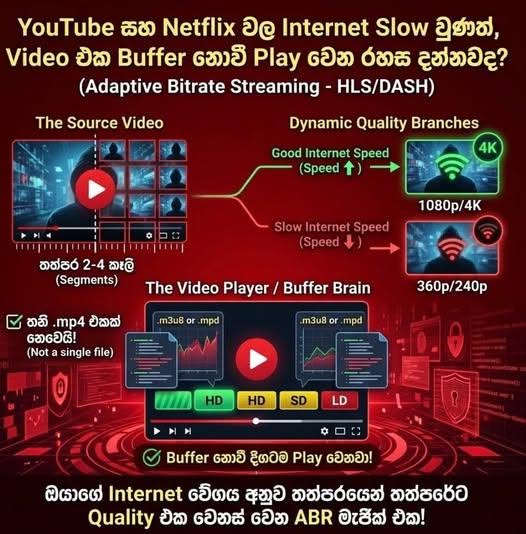
While this transition feels effortless to the viewer, it is powered by a sophisticated software engineering architecture known as Adaptive Bitrate Streaming (ABR). Here is a look under the hood at how modern video streaming actually works.
Quick Comparison: Traditional Progressive Download vs. Adaptive Bitrate Streaming (ABR)
| Feature | Traditional Video (.mp4 Download) | Adaptive Bitrate Streaming (ABR) |
|---|---|---|
| File Structure | Single large monolithic video file | Thousands of tiny 2–4 second chunks across multiple resolutions |
| First File Loaded | The raw video file itself | A lightweight text Manifest File (.m3u8 or .mpd) |
| Slow Internet Behavior | Video freezes and shows a buffering wheel | Seamless downgrade to a lower resolution (e.g., 1080p → 360p) |
| Bandwidth Efficiency | Wastes data downloading fixed quality | Dynamically matches real-time network speed |
1. You Aren't Watching a Single .mp4 File
A common misconception is that when you press "Play" on YouTube, a massive .mp4 file sitting on a server begins downloading piece by piece to your phone or computer.
In reality, modern streaming platforms never serve a single monolithic file. The moment a creator uploads a video to YouTube, backend servers process the raw file through two critical stages: Transcoding and Segmenting (Chunking).
- Multi-Resolution Transcoding: The server encodes the original video into multiple copies across different resolutions and bitrates—such as 144p, 360p, 720p, 1080p, and 4K.
- Video Chunking (Segmenting): Next, every single one of those resolution copies is sliced into thousands of tiny video segments (chunks), each lasting just 2 to 4 seconds.
2. The "Magic Map": The Manifest File (.m3u8 / .mpd)
When you click on a video, the server does not immediately send you video data. Instead, the very first thing sent to your browser or app is a tiny, lightweight text file called a Manifest File—typically an .m3u8 file (used in Apple's HLS protocol) or an .mpd file (used in MPEG-DASH).
Think of the Manifest File as a master roadmap or index. It contains the exact server URLs for every 2-second video chunk across every available resolution:
Plaintext
Chunk 1 (Seconds 0–2): [360p URL] | [720p URL] | [1080p URL] | [4K URL] Chunk 2 (Seconds 2–4): [360p URL] | [720p URL] | [1080p URL] | [4K URL] Chunk 3 (Seconds 4–6): [360p URL] | [720p URL] | [1080p URL] | [4K URL]
3. A Smart Video Player Making Split-Second Decisions
Once your browser or mobile app receives the Manifest File, the client-side Video Player takes control and begins making real-time algorithmic decisions every few seconds:
- Fast Startup: Because the player wants the video to start instantly when you click play, it typically requests the very first 2-second segment (Chunk 1) in a moderate resolution like 480p.
- Real-Time Bandwidth Calculation: The player measures exactly how many milliseconds it took to download Chunk 1 to calculate your real-time internet speed (throughput) and buffer health.
- Scaling Up to HD/4K: If your connection is fast, the player fetches the next 2-second segment (Chunk 2) from the 1080p or 4K URL list.
- Instant Downgrading on Slow Networks: If your Wi-Fi drops or mobile data suddenly congests, the player detects the slowdown immediately and requests Chunk 3 from the 240p or 360p directory instead of waiting for a heavy HD chunk to load.
Why Doesn't the Video Glitch When Switching Quality?
Every single video chunk across all resolutions is Keyframe-aligned—meaning each segment is cut at the exact same millisecond and frame boundary. Because the timestamps align down to the frame, the player can stitch a 360p chunk directly onto the end of a 1080p chunk without a single stutter, audio pop, or pause.
How to See Adaptive Bitrate Streaming in Action Yourself
You don't have to take anyone's word for it—you can watch this happen live in your web browser right now:
- Open YouTube in Google Chrome, Edge, or Firefox and start playing any video.
- Right-click anywhere on the page and select Inspect (or press F12) to open Developer Tools.
- Click on the Network tab.
- In the filter box, type videoplayback.
As the video plays, you won't see one giant file downloading. Instead, you will see a steady stream of small videoplayback network requests firing every few seconds—each one fetching the next tiny chunk of video tailored to your current internet speed.
Frequently Asked Questions (FAQ)
What is Adaptive Bitrate Streaming (ABR)? Adaptive Bitrate Streaming is a video delivery technique that encodes a single source video into multiple bitrates and resolutions, splits them into short segments, and dynamically serves the best quality segment based on the viewer's real-time network speed and device capabilities.
What are .m3u8 and .mpd files in video streaming? They are Manifest Files (playlists) that tell the video player where to find each short segment of video at different quality levels. .m3u8 is used by HLS (HTTP Live Streaming), while .mpd is used by MPEG-DASH.
Why are videos split into 2-to-4-second chunks? Splitting videos into tiny chunks allows the video player to react almost instantly to changes in internet speed without wasting bandwidth or forcing the user to wait for a large file to buffer.
Tags: #SoftwareEngineering #SystemDesign #VideoStreaming #YouTube #Netflix #HLS #WebDevelopment #FrontendEngineering #AdaptiveBitrateStreaming